
Hashids Encode
The Hashids Encode algorithm allows you to encode numerical values into encoded hash values. This is usually helpful, when you do not want to expose numerical values to the user.
The example of this data manipulation can be seen in the table below:
| Source Column | Target Column |
|---|---|
| 347 | yr8 |
| 27, 986 | 3kTMd |
To configure the Hashids Encode step, follow the instructions below:
- In the Admin Navigation tree, select Interfaces > InterfaceName > Tasks > TaskName > Steps.
- On the toolbar, click New >New Manipulate Step.
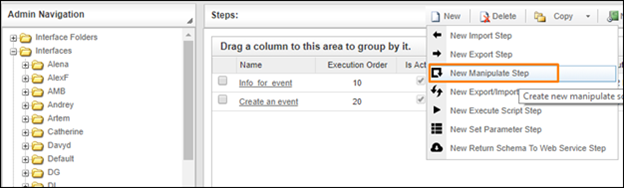
Creating a New Manipulate Step
- Navigate to the Keys section and select Hashids Encode.

Keys Section
- In the Hashids Encode work area, fill in the following fields:
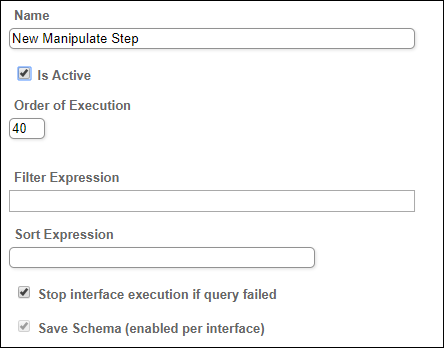
Common Fields
The following table describes these fields available for this step:
| Fields | Description |
|---|---|
|
Name |
Provide a distinctive name for this step. |
|
Is Active |
Select the check box to engage the scheduler for this step. |
|
Order of Execution |
Enter the order in which this step should be executed. |
|
Filter Expression |
Optional. Use this filed to filter data from the source database prior to inserting it into the Schema table. |
|
Sort Expression |
Optional. Use this field to sort data from the source database prior to inserting it into the Schema table. |
|
Stop interface execution if query failed |
Optional. If enabled, the system will stop any data manipulation if the query returns an error. |
|
Save Schema (enabled per interface) |
If selected, the schema is created for this step. |
| Is Multi Mapping |
If you choose this option than you can manipulate multiple different columns at the same step. |
|
Source Column |
Specify the column that contains the source data you want to encode. |
|
Target Column |
Specify the destination column where the result of the operation will be stored. |
|
Salt |
A string that will be used to encode the hash value. The same string should be provided later in the Hashids Decode manipulation step, if you want to decode values back. |
|
Characters |
A string of characters to be used in the resulting hash value. By default, characters from the Latin alphabet and digits are used. |
|
Min Length |
The minimum length of the resulting hash. |
- Click the Save button.